Vendor Compliance Dashboard Explained: Complete Guide for Manufacturing Companies (2026)
Managing hundreds of vendor documents, approvals, renewals, and compliance tasks through spreadsheets makes it difficult to identify risks quickly. A Vendor Compliance Dashboard brings all critical compliance information into a single view, helping procurement and compliance teams make faster, data-driven decisions.
For manufacturing companies, logistics providers, warehouses, engineering firms, and food processing businesses, a dashboard improves visibility, reduces manual effort, and supports audit readiness.
What is a Vendor Compliance Dashboard?
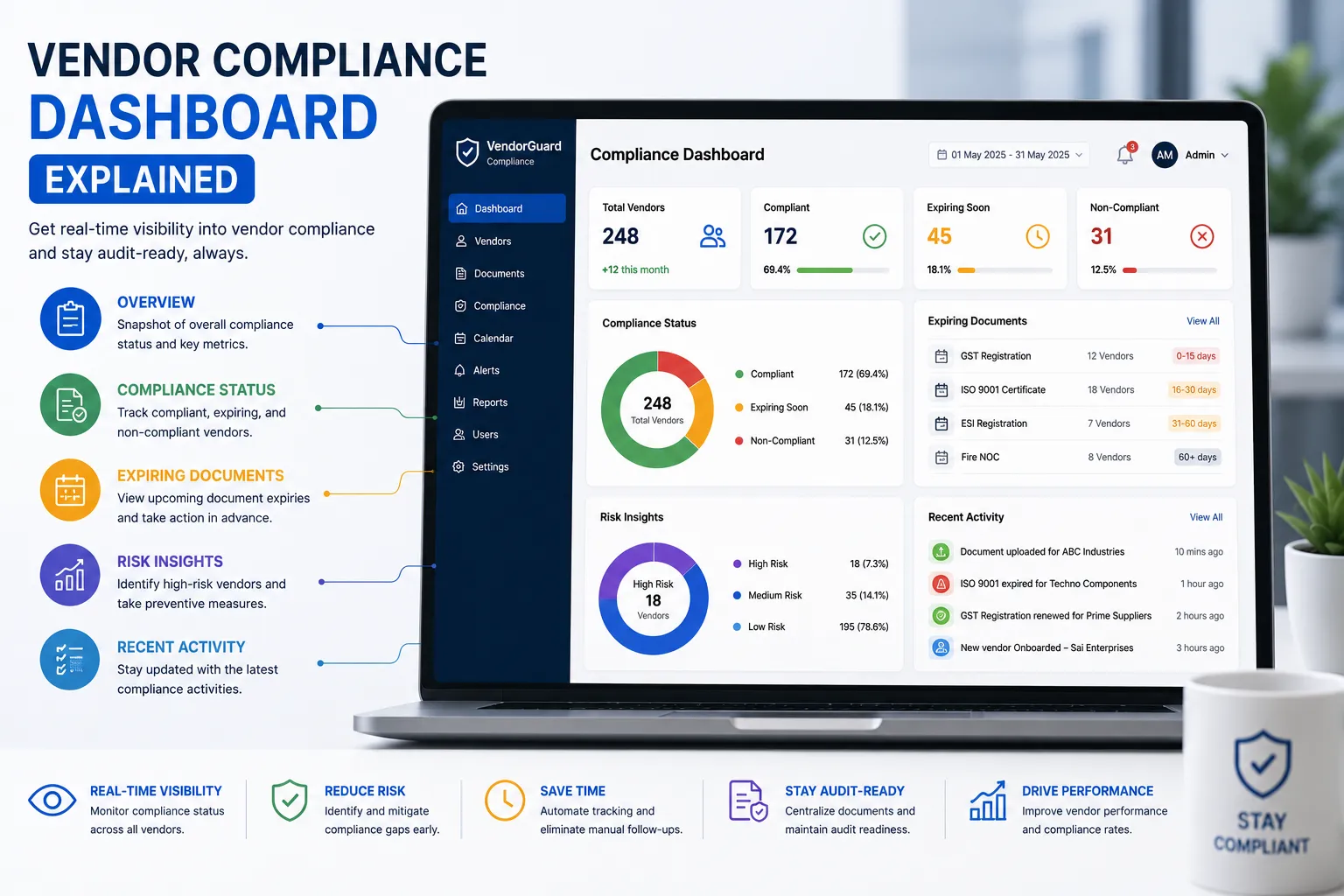
A Vendor Compliance Dashboard is a centralized screen that displays real-time compliance information for all vendors. Instead of checking multiple spreadsheets or folders, users can instantly see document status, pending approvals, upcoming expiries, audit readiness, and vendor performance.
Why is a Dashboard Important?
Without a dashboard, organizations often struggle with:
- Limited visibility into compliance status
- Missed document renewals
- Slow audit preparation
- Manual reporting
- Delayed approvals
- Difficulty identifying high-risk vendors
| Without Dashboard | With Dashboard |
|---|---|
| Multiple spreadsheets | One centralized view |
| Manual reports | Real-time dashboards |
| Reactive compliance | Proactive monitoring |
| Limited visibility | Actionable insights |
| Audit stress | Audit-ready records |
Who Should Use It?
| Industry | Recommended |
|---|---|
| Manufacturing | ✅ |
| Logistics | ✅ |
| Warehousing | ✅ |
| Food Processing | ✅ |
| Automotive | ✅ |
| Engineering | ✅ |
| Construction | ✅ |
Key Metrics to Display
A useful Vendor Compliance Dashboard should include:
- Total vendors
- Compliant vs non-compliant vendors
- Documents expiring in 30/60/90 days
- Pending document approvals
- Expired documents
- Vendor onboarding status
- Compliance score
- Vendor risk level
- Audit readiness percentage
- Recent compliance activities
Key Benefits
- Real-time compliance visibility
- Faster decision-making
- Better audit preparation
- Early identification of risks
- Reduced manual reporting
- Improved accountability
- Better management reporting
Essential Features
Look for software that provides:
- Interactive dashboards
- Custom filters
- Compliance KPIs
- Vendor scorecards
- Document expiry tracking
- Automated alerts
- Approval workflow status
- Audit trail
- Exportable reports
- Role-based access
Real Manufacturing Example
A manufacturing company manages 400 suppliers across several plants. Before using a dashboard, procurement teams spent hours preparing weekly compliance reports. After implementing a centralized dashboard, managers could instantly identify expiring documents, pending approvals, and non-compliant vendors, allowing them to resolve issues before they affected production.
Daily Dashboard Review Process
- Review compliance summary
- Check expiring documents
- Monitor pending approvals
- Identify high-risk vendors
- Follow up on overdue actions
- Export management reports
- Prepare for upcoming audits
Buying Checklist
Before selecting compliance software, ensure it includes:
- Real-time dashboards
- Compliance KPIs
- Vendor-wise filters
- Automated alerts
- Approval workflow tracking
- Audit reporting
- Historical trends
- API integration
- Mobile access
- Role-based permissions
Common Mistakes
- Tracking only expired documents
- Ignoring compliance trends
- Reviewing dashboards infrequently
- No executive reporting
- No vendor risk indicators
- Manual report generation
- No historical analysis
Best Practices
- Review dashboard metrics daily.
- Configure alerts for upcoming expiries.
- Share executive summaries with management.
- Monitor compliance trends monthly.
- Use dashboards alongside vendor scorecards.
- Continuously improve KPI targets.
Why VendorCompliancePro?
VendorCompliancePro provides a centralized Vendor Compliance Dashboard with:
- Real-time compliance status
- Vendor onboarding progress
- Document expiry tracking
- Automated reminders
- Approval workflow visibility
- Vendor performance insights
- Audit trails
- Reports and analytics
- AI-powered document validation
This helps procurement teams stay proactive, reduce compliance risks, and remain audit-ready.
Frequently Asked Questions
What is a Vendor Compliance Dashboard?
It is a centralized dashboard that displays compliance status, document expiries, approvals, and key vendor compliance metrics.
Which KPIs should be included?
Compliance score, expiring documents, pending approvals, onboarding status, vendor risk, and audit readiness are among the most useful KPIs.
How often should the dashboard be reviewed?
Critical dashboards should be reviewed daily, with management summaries shared weekly or monthly.
Does VendorCompliancePro include dashboards?
Yes. VendorCompliancePro includes real-time dashboards, compliance KPIs, reminders, reporting, and audit tracking.
Conclusion
A Vendor Compliance Dashboard gives procurement and compliance teams a clear view of vendor health, document status, and compliance risks. By replacing manual reporting with real-time insights, organizations improve efficiency, strengthen governance, and make better supplier decisions.